Split View Multi Screen Tablet17.2
Publisher Description
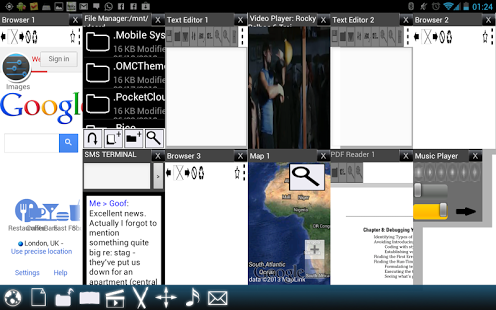
*LOW INTRODUCTORY PRICE*THIS IS ONE OF MY MULTI-TASKING SOLUTIONS - VIEW MY OTHER APPS FOR MORE (TRY MULTISCREEN MULTITASKING)*TABLET VERSION IS THE SAME WITHOUT SMS TERMINAL*
Split View Multiscreen is a beautiful solution for multitasking on your device. Unfortunately Android won't let you run more than one app at once, but Split View Multiscreen gets around this by providing you with a host of built-in apps that an be run as tiles on a grid. Open a browser and enjoy the web full screen, open two browsers side-by-side, or open 10 apps at once in a beautiful formation.
You can watch videos, read PDFs, listen to music, browser multiple sites, edit text documents, draw in a drawpad, browse your files and much more all in one app. This is the way multitasking SHOULD be on an Android device... give it a try!
About Split View Multi Screen Tablet
The company that develops Split View Multi Screen Tablet is NQR Productions. The latest version released by its developer is 17.2. This app was rated by 5 users of our site and has an average rating of 4.2.
To install Split View Multi Screen Tablet on your Android device, just click the green Continue To App button above to start the installation process. The app is listed on our website since 2014-01-09 and was downloaded 616 times. We have already checked if the download link is safe, however for your own protection we recommend that you scan the downloaded app with your antivirus. Your antivirus may detect the Split View Multi Screen Tablet as malware as malware if the download link to nqr.splitviewtablet is broken.
How to install Split View Multi Screen Tablet on your Android device:
- Click on the Continue To App button on our website. This will redirect you to Google Play.
- Once the Split View Multi Screen Tablet is shown in the Google Play listing of your Android device, you can start its download and installation. Tap on the Install button located below the search bar and to the right of the app icon.
- A pop-up window with the permissions required by Split View Multi Screen Tablet will be shown. Click on Accept to continue the process.
- Split View Multi Screen Tablet will be downloaded onto your device, displaying a progress. Once the download completes, the installation will start and you'll get a notification after the installation is finished.
Program Details
System requirements
Download information
Pricing
Version History
version 17.2
posted on 2014-01-09
10/10/2013,Big update brings multiple PDFs, widgets in windows, a visual manager, multiple maps, UI tweaks, homepages, support for live wallpapers and more!,05/06/2012,30/03/2012,04/12/2012,23/11/2012,19/11/2012,22/10/2012,App goes live woohoo!
version 5
posted on 2013-06-05
Several fixes and updates
